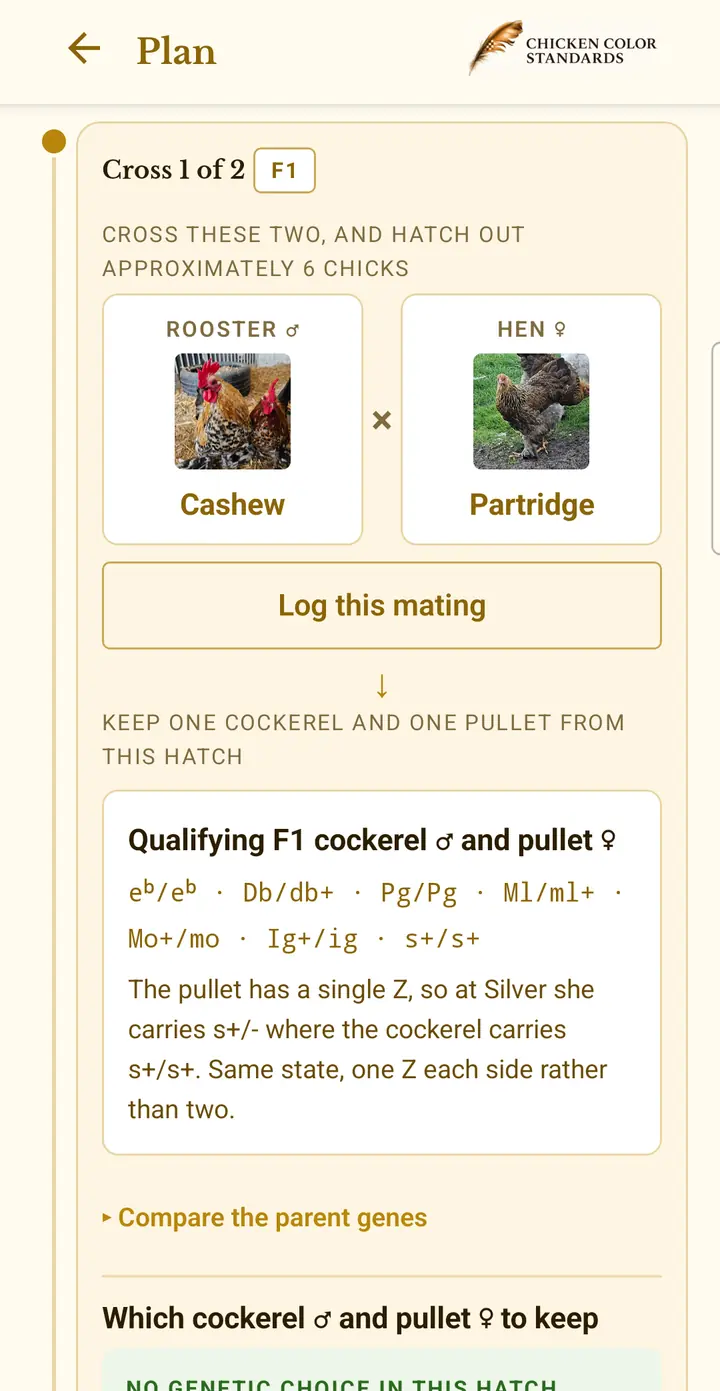
Start with your flock and a colour you want to breed. Build a Roadmap showing the crosses to make, what you may need to bring in, and which chicks to keep for the next generation.
Use the same chicken records to explore crosses, save a colour plan and follow your breeding across seasons.
Free to start: up to 5 chickens, one photo each and one saved plan. Logging matings and comparing alternative routes are included with Planner.
ROADMAP IN THE APP
See how a Roadmap guides your breeding.
Watch a Lemon Blue Mille Fleur plan in the app. Choose the target, explore the crosses and compare alternative routes, then see where to mark the plan complete.
Ready to follow your own plan? See how Roadmap connects to your flock, matings and hatches.
Roadmap: from your flock to a target colour
Choose the colour you want to breed, or enter a custom target genotype. Roadmap uses your flock records to show where to start, what needs checking and which chickens you may need to bring in. Each cross names the parents, gives an approximate hatch size and explains which chicks to keep for the next generation. Save your plan and return as your flock develops; reopening it updates the route from your records.
Saved goals and route comparison
A colour goal you can return to
The target stays alongside progress through the matings you record. A saved plan connects a longer-term colour goal with the pairing you are working on now.
As chicks join your flock and you confirm more of their genes, reopen the plan to see the route from your updated records.
Compare more than the number of crosses
Different routes can involve different parents and hatch sizes. Read the route's caveats as well as its summary before deciding which to follow.
Alternative-route comparison is included with Planner. Building a colour plan and seeing what your flock is missing remain free.
Can I start with the chickens I already have?
The plan compares your target with your flock records. It shows what is missing and what needs checking before you start. A gene you have not recorded is not treated as absent. Confirming more of a chicken's genes can change the route when you reopen the saved plan.
What does a Roadmap tell me to do?
Follow the parents for each cross, the approximate number of chicks to hatch, and the cockerel or pullet to retain. A chick kept for an intermediate cross may carry what the next generation needs without showing the finished colour yet. The plan is a guide to expected genetic outcomes; a particular hatch can differ.
How do I turn a plan into records?
Save the Roadmap. When both parents for a step are in your flock, use Log this mating with Planner access. Record the eggs and hatch, then add the chicks you keep to your flock with their parents and hatch date. Your saved plan uses the updated flock when you open it again.
APP OVERVIEW
Explore Home, Flock and Breeding
See what you can do from Home, how to filter and group your flock by gene, and where to find your saved plans in Breeding.
One flock, from the first pairing to the next generation
The features share your chicken records. You can explore a single cross in Calculator or start with a colour goal in Roadmap, then follow the breeding you actually do.
- Record your flockKeep photos, parentage and known genes together. These records supply the parents for your calculations and plans.
- Explore or planTry a pairing in Calculator, or choose a target colour for a Roadmap from your flock.
- Log a matingTurn a Calculator pairing or a Roadmap step into a mating record. Planner
- Record the hatchRecord eggs set and chicks hatched. Keep each batch linked to its mating or recorded source.
- Keep your chicksAdd the chicks you retain to Flock, with their parents and hatch date. Record their sex and confirm genes as you learn more.
- Continue the planReopen a saved Roadmap using your updated flock. Follow the family relationships as the next generation grows.
The cycle returns to your flock. Predicted offspring become chicken records only when you choose to keep them. You record what happened; the app calculates the breeding possibilities from those records.
Calculator: explore a pairing before you breed
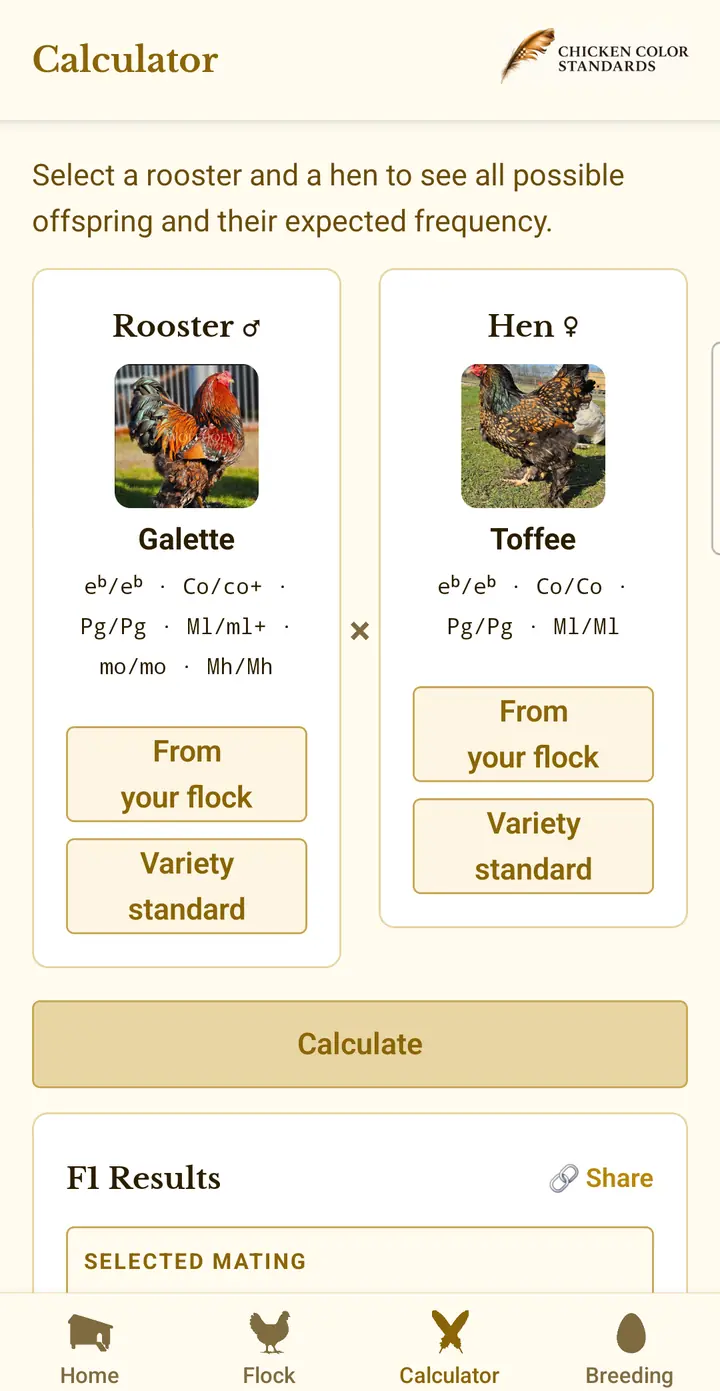
Pick a rooster and a hen — from your own flock or from a documented variety standard — and the calculator lists the predicted offspring genotypes for the pairing, with its expected share of the hatch and the colour it produces. Tick the genotypes you want and the app adds up how much of the hatch that is, and roughly how many chicks you would need to hatch to get one. Where an outcome matches a recognised variety, it says so.
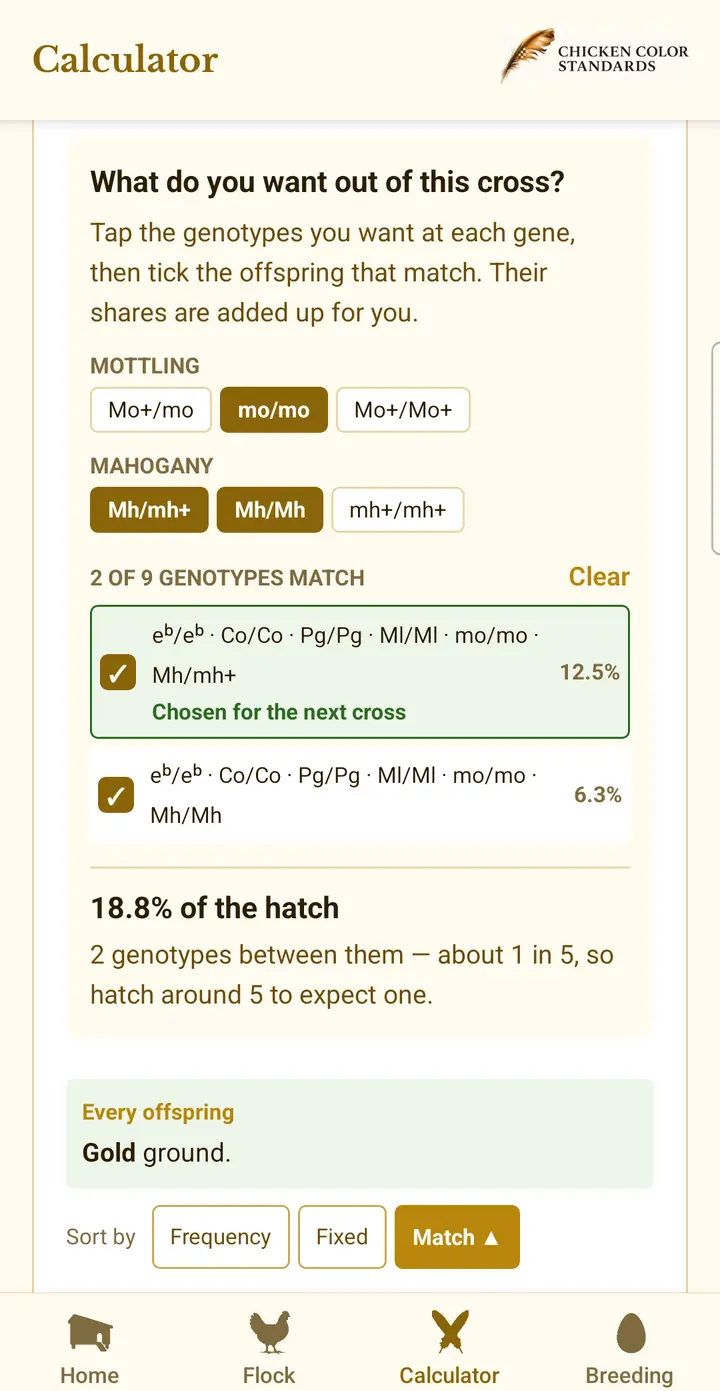
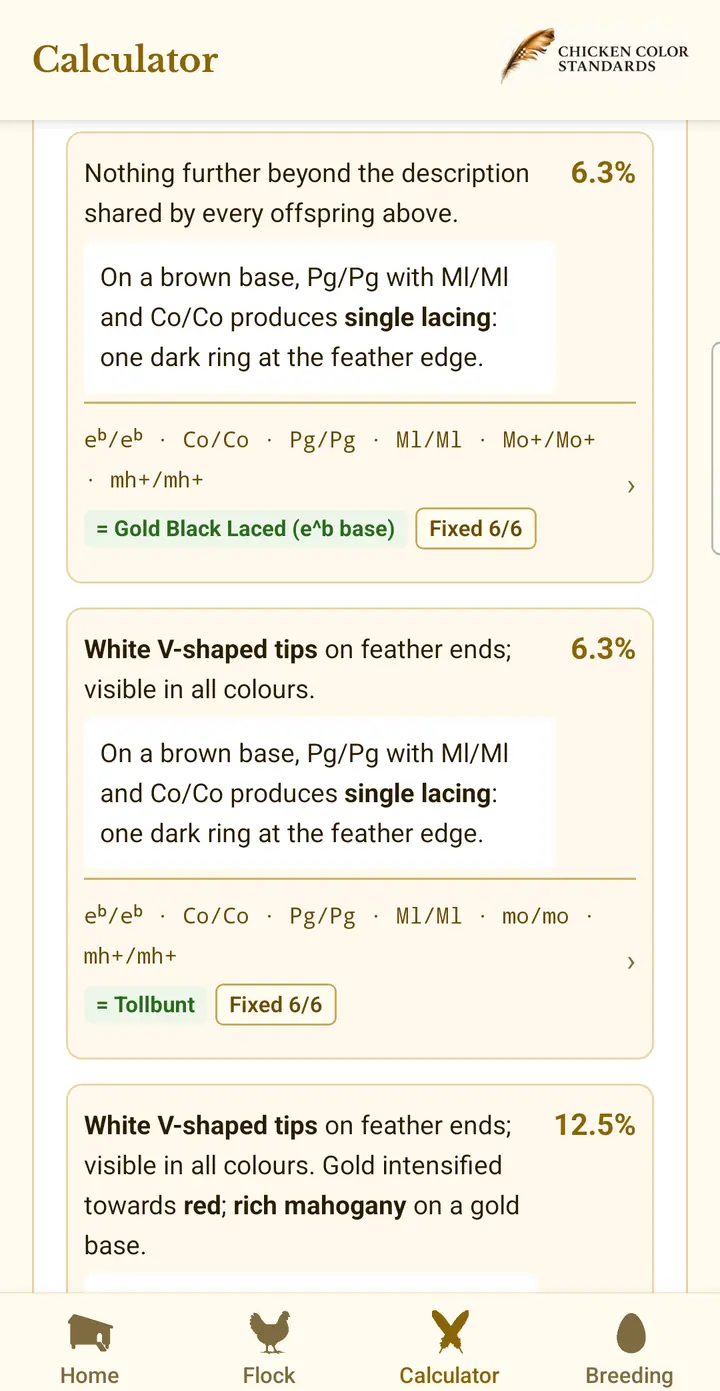
Carry selected outcomes into F2 and later generations, compare intercrosses with backcrosses, and see how a breeding route develops beyond a single mating. Genotype frequencies are shown for every cross, and the built-in genetics introduction works through Punnett squares for the underlying chicken colour genetics. Predictions describe expected genetic outcomes; individual hatches can vary.
With Blue, Splash and Black, the outcome depends on whether each parent passes on the Blue allele. A bird can carry recessive lavender without showing it. Crossing a lavender bird with a non-carrier produces F1 carriers, and pairing two of those carriers can produce lavender chicks in F2.
Flock: the records behind every plan
Record each chicken's colour or variety, sex, hatch date, parents, generation, breeding pen, photos and known genetics. Group and sort your flock — by colour, genes, sex, age, breed or parents — so useful breeding birds are easier to find, and track colour development with photos that are dated and organised automatically. Each bird's genotype is saved gene by gene; genes you have not recorded are treated as unknown rather than absent, so plans ask you to check them instead of guessing.
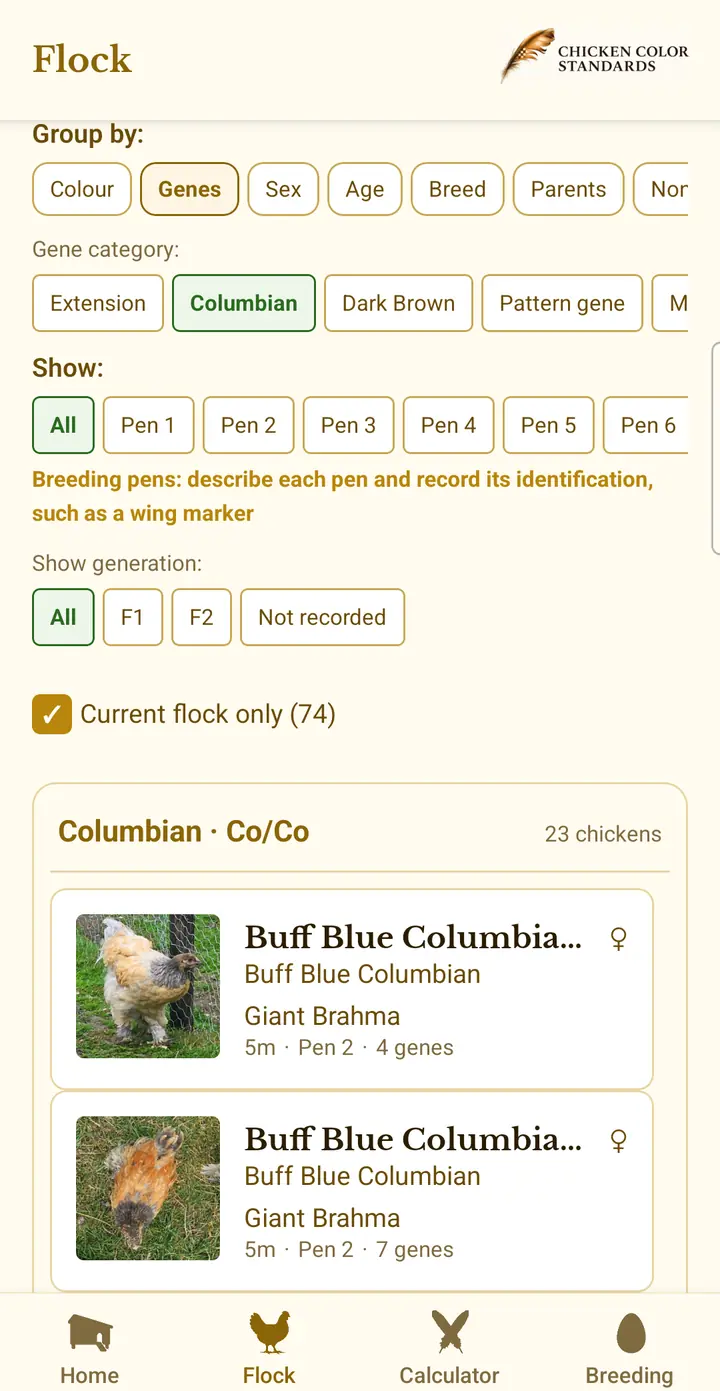
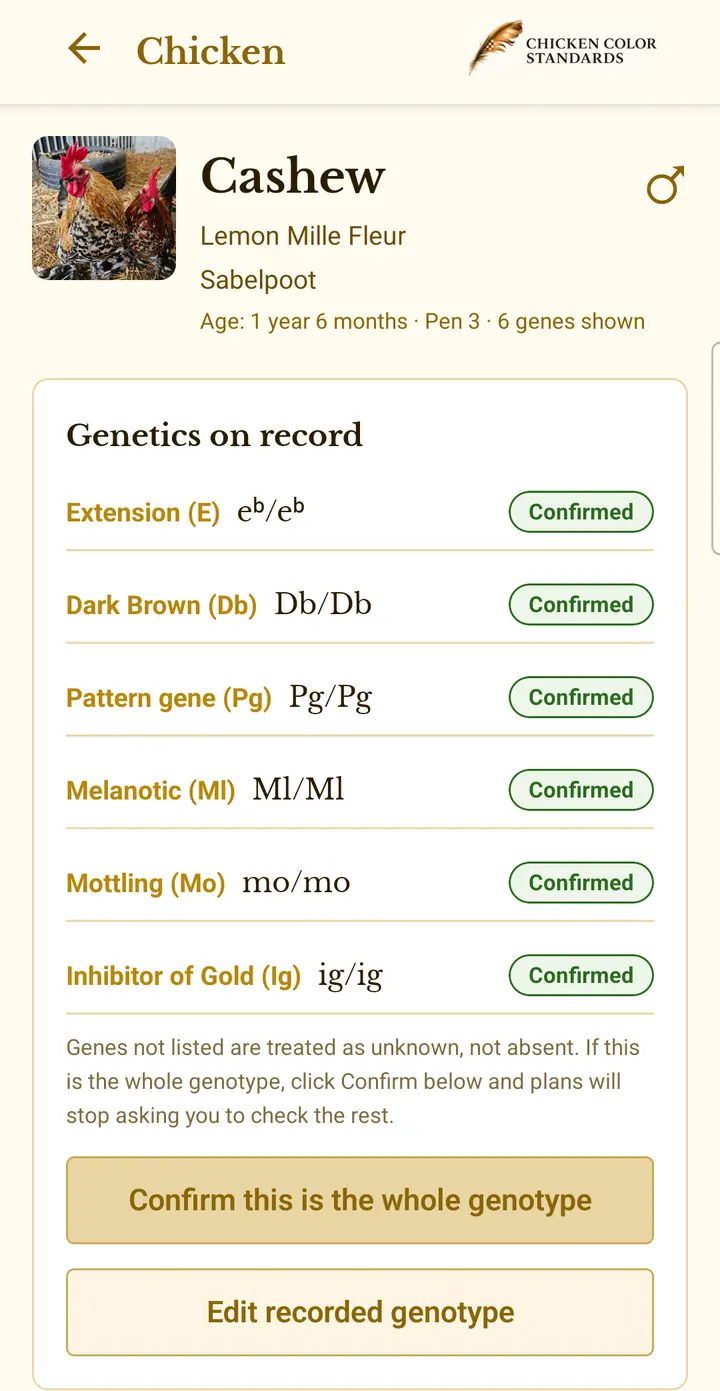
Because parents are recorded on each bird, the app's family tree shows parents, mates, chicks and later generations, so you can follow a breeding line from the first pairing to the birds you keep.
Follow the breeding you actually do
Matings, Hatches and Family Tree connect your breeding plans with your flock records. Open a topic to see how.
Matings and Hatches: from pairing to chicks
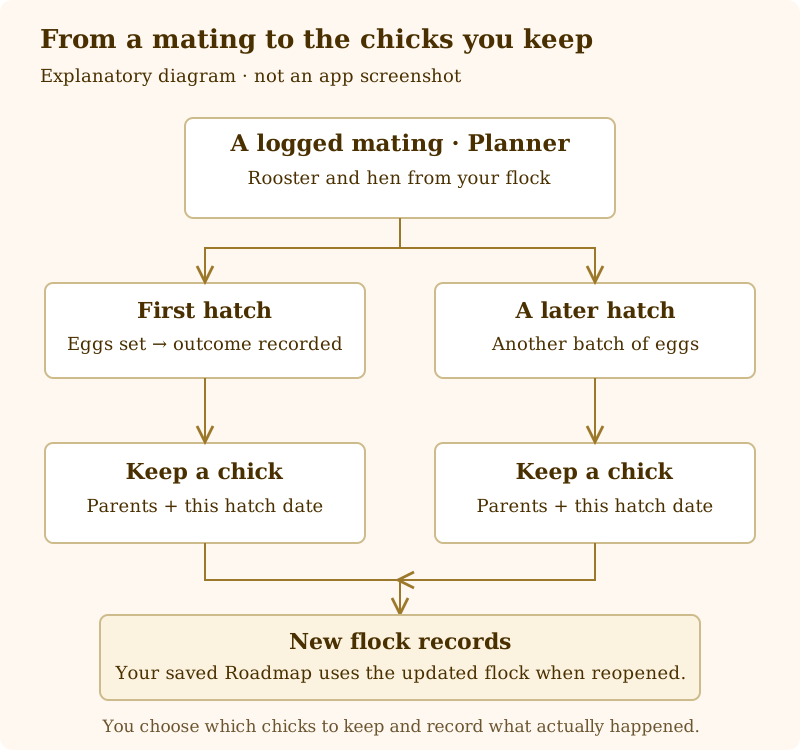
With Planner, log a mating from Calculator or a Roadmap step. Record each batch of eggs in Hatches, including later batches from the same pairing. The app calculates lockdown and hatch day from the date eggs were set, with reminders if enabled. Enter how many hatched and keep the chicks you want as flock records.
Family Tree: follow relationships across generations
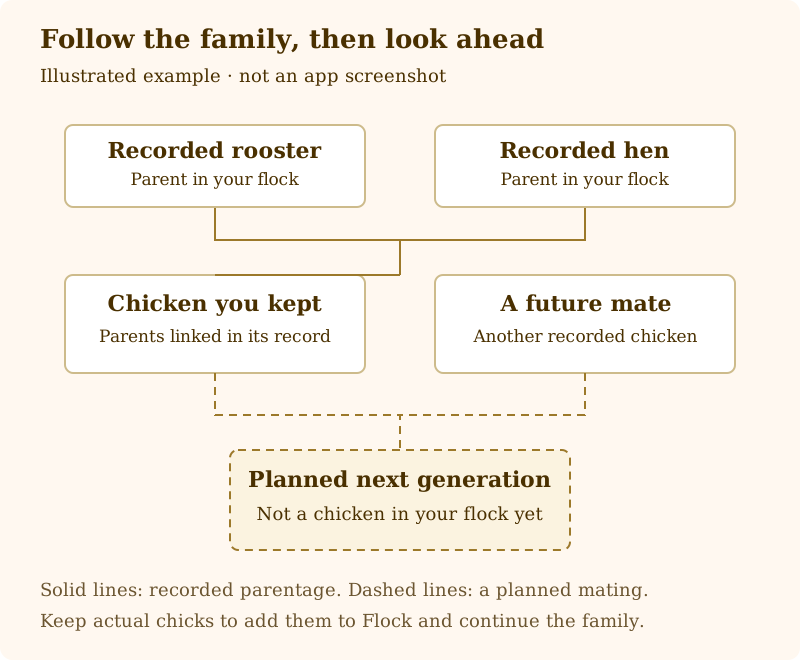
See recorded parents, mates and descendants as a tree or list. Open the tree from a chicken, a mating or a saved plan. Plan ahead can also show planned matings and future chickens, visually distinguished from the chickens already in your flock.
Breeding pens: keep groups and hatch sources connected
Group chickens by breeding pen and record eggs from a pen in Hatches. Pen membership dates help keep the possible parents connected to the hatch. Where parentage is uncertain, you still need to record or confirm it.
Home: see what needs attention next
Return to a recent plan or calculation and see reminders based on your records, including upcoming hatch dates, hatch outcomes still to record and chicks ready to have their sex recorded.
Start free
- Record a flock of up to 5 chickens
- Add 1 reference photo per chicken
- Calculate multi-generational crosses and view expected male/female outcomes
- Explore genotype frequencies and Punnett squares
- Build a practical roadmap toward a documented colour or custom genotype
- See missing genes, and which chicken colour and sex may need to be introduced
- Save 1 breeding plan
- Record hatches and track breeding pens
Learn as you go
A built-in genetics introduction and searchable glossary explain the genes, inheritance terms and colour patterns used throughout the app — the same ground the free Genetics Guide and Glossary cover here on the site.
Planner access
Planner adds capacity for more chickens, plans and photos. It also adds alternative-route comparison, mating records and documented breed standards for working back toward breed type.
Questions about the chicken breeding app
Is the chicken breeding app free? Yes. The free tier includes the full Calculator, up to five chickens with one photo each, one saved Roadmap, hatch records and breeding pen tracking.
Is there an iPhone version? Yes. Download it on the App Store for iPhone or on Google Play for Android.
How is the app different from the free web calculator? Use the web breeding calculator for a quick cross. The app saves flock records, lets you carry predicted offspring into later crosses, and keeps breeding plans you can revisit.
Can the app tell me which chickens to buy? A Roadmap can show which genes are missing and suggest the colour and sex of a bird that could help start the route. It gives you criteria to look for when choosing a bird.
Do I need to understand genetics first? No. Start with a documented colour variety. The app’s genetics introduction and searchable glossary explain the terms as you go.
Reference: Genetics Guide · Glossary · FAQ · All Topics